
A local rank tracker shows where your business appears in Google Maps from many points across your area, not just from your desk. The most useful kind is a geo-grid: the same search run from a grid of points, each shown as a dot with your position. Read it for coverage, how much of the area you win, rather than any single number.
Why one Google Maps ranking check isn’t enough
Map rankings change with the searcher’s location. In our study of 120 top-3 map spots in St. Petersburg, 58% of the winning listings were within a mile of the person searching. So a business can be first outside its door and missing a mile away. A single search from your office tells you about one spot.
How a geo-grid rank tracker works
You choose a search term, a center point (usually your business), a grid size (for example 7 × 7 points) and the spacing between points. The tool runs the search from every point and records your rank in the map results at each one.
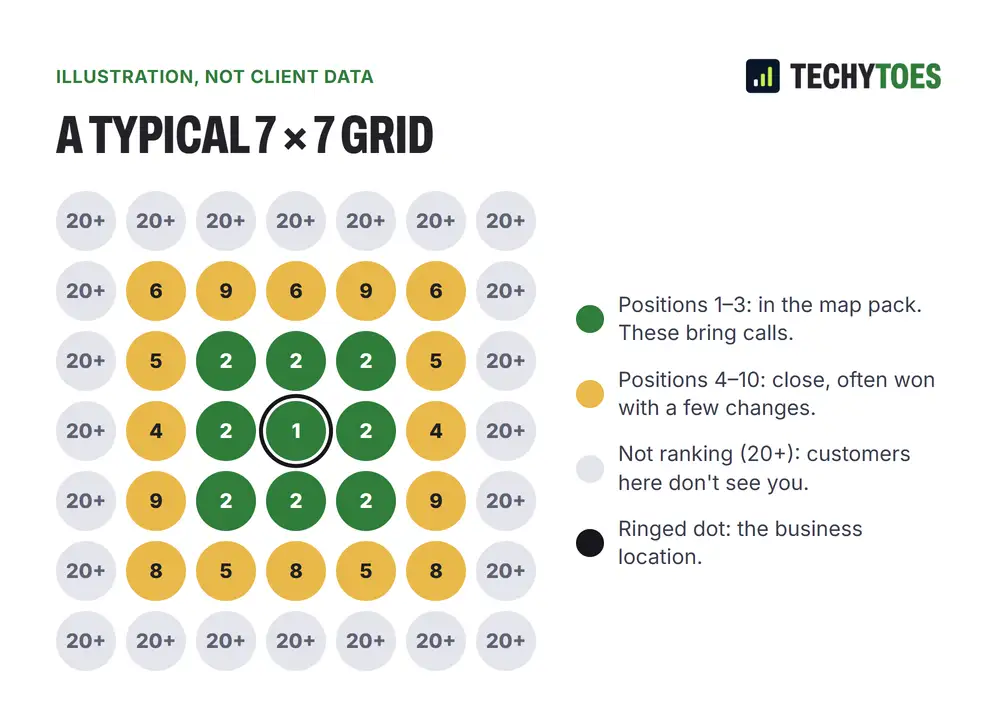
How to read a geo-grid report
- Top-three dots are where you’d appear in the map pack. These are the ones that bring calls.
- Positions 4–10 are close. These are the areas a few changes can win.
- Not ranking (20+) means customers there won’t see you in the map.
- Coverage is the share of points where you’re in the top three. Track this number month to month.
- The shape tells you about distance: a tight cluster around the center is normal; a lopsided one often follows a competitor cluster or a geographic barrier like a bridge or causeway.
Compare reports from the same term, center, grid size and spacing. Change any of those and the comparison stops meaning anything.
How we use it in an audit
Every audit we run starts with a grid for the client’s two or three most valuable searches. That shows us where the listing wins today, where it’s close, and where distance means the website has to do the work instead. We run the same grid each month afterward, so progress is measured, not guessed.
[ADD: an anonymised example grid report from an audit, with the term, grid size, spacing and date labelled]
Setting up a grid that means something
- Pick searches customers actually make, like “water heater repair”, not your business name.
- Center the grid on your verified address.
- Match spacing to your area. Tighter in a dense city center, wider for a service area that spans a county.
- Keep the settings fixed from month to month.
- Note what changed each month so you can connect cause and effect.
Local SEO tools: what a grid doesn’t tell you
A grid measures the map only. It doesn’t show organic website rankings, AI answers, or calls. Pair it with Search Console for website rankings, your Business Profile performance report for calls and clicks, and your own call tracking for leads. Rankings are a means; calls and booked jobs are the result.
Key takeaways
- One search shows one spot. A grid shows your whole area.
- Watch coverage, the share of points in the top three.
- Keep settings fixed so months compare fairly.
- Pair it with calls and leads, not just positions.
We run grids as part of our GBP optimization services, before we start and every month after.
Frequently asked questions
What is a geo-grid rank tracker?
A tool that runs the same Google Maps search from many points laid out in a grid over your area, and records where your business ranks at each point. The result is a map of colored dots showing where you win, where you're close and where you don't appear.
How often should I run a local rank tracking grid?
Monthly is enough for most small businesses. Rankings move gradually, and checking daily mostly shows noise. Run one before you change anything, then at the same time each month with the same settings.
Why does my ranking look different when I search on my own phone?
Your own search uses your exact location and your search history, so it shows one point of view. A grid checks from fixed points without personal history, which is why it's the fairer way to compare month to month.